LinkedIn for Students & New Grads: A Step-by-Step Setup
- My PenPoint Team

- Jul 9
- 7 min read
LinkedIn isn't just a place to park your resume. It's where recruiters search for candidates, where referrals happen, and where many first job opportunities quietly begin. The catch? Most student profiles are half-finished — a photo, a school name, and not much else.
This guide walks you through a clean, credible LinkedIn setup, step by step, even if you have little or no work experience yet. You'll learn exactly what to write, what to skip, and how to make your profile easy to trust.
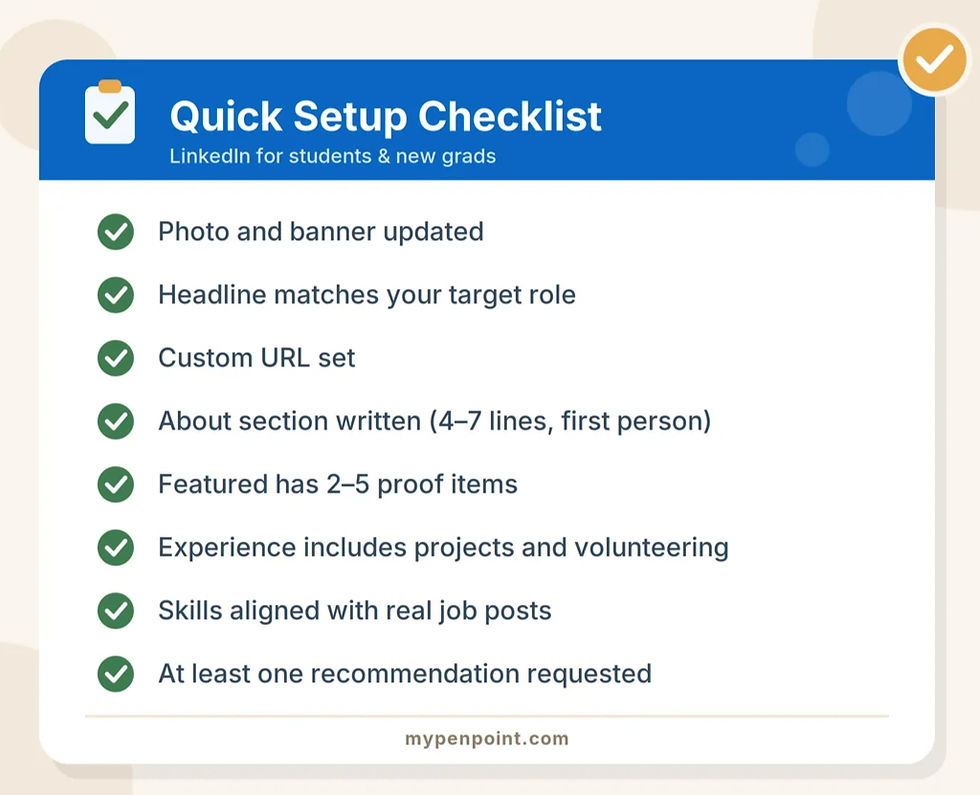
Quick answer: To set up LinkedIn as a student or new grad, upload a clear profile photo, write a headline that names your target role, customize your profile URL, write a short About section (4–7 lines), add 2–5 proof items to your Featured section, list projects and volunteer work under Experience, align your Skills with real job posts, and request at least one recommendation.
Why LinkedIn Matters Even Before Your First Job
Hiring has moved online, and social platforms now play a real role in how people find work. Research from Pew Research Center shows that a large share of job seekers use online resources and social media in their job search; and on the employer side, LinkedIn is often the first place a recruiter looks after reading your application.
Think of your profile as a landing page for your career. Before anyone replies to your message or application, they'll skim it for about 10 seconds. Your job is to make those 10 seconds count.
Step 1: Nail the Basics — Photo, Banner, and Location
First impressions on LinkedIn are visual. Before you write a single word, fix these three things:
Profile photo: clear, well-lit, neutral background, friendly expression. A phone photo taken by a friend near a window works perfectly — no professional shoot needed.
Banner image: keep it simple and relevant. School colors, a clean pattern, or a subtle image tied to your target industry all work. Free tools like Canva have LinkedIn banner templates sized correctly.
Location: use the city where you can actually work, or the city where you're targeting roles. Recruiters filter searches by location, so this small detail affects whether you show up at all.
Step 2: Write a Headline That Says Where You're Going
Your headline doesn't have to be your current job title, and as a student, it shouldn't be. Use those 220 characters to show your direction and your strongest skills, because your headline appears everywhere: in search results, comments, and connection requests.
Two headline formulas that work
Student/Graduate + Target role + 1–2 strengths. Example: “Business Admin Graduate | Entry-Level Operations | Excel + Process Improvement”
Target role + Proof + Tools. Example: “Aspiring UX Designer | Portfolio: 3 Case Studies | Figma + User Research”
Avoid vague labels like “Seeking opportunities” or “Hardworking student.” They tell recruiters nothing. Name the role you want, because that's what recruiters type into the search bar.
Step 3: Customize Your URL and Contact Info
Custom URL: change the default string of numbers to linkedin.com/in/yourname (or yourname-role). It looks cleaner on resumes and email signatures. The LinkedIn Help Center has current instructions if the setting has moved.
Email: use a professional address you actually check daily — ideally firstname.lastname@gmail.com, not your old username from high school.
Portfolio or website: add one if you have it. Even a simple Notion page or a shared Google Drive folder with your best work counts.
Step 4: Write an About Section That Sounds Like a Real Person
This is where most students freeze. Keep it short, specific, and forward-looking — 4 to 7 lines is plenty. Write in first person, and skip the buzzwords.
Use this template: “I'm a [student/new grad] focused on [target area]. I enjoy [2–3 relevant tasks]. Recently, I [project, internship, or coursework result]. I'm currently looking for [role type] opportunities where I can contribute [strength].”
One tip: the first two lines matter most, because LinkedIn truncates the rest behind a “see more” link. Lead with your target role and your best proof point.
Step 5: Add Featured Items (Yes, Even If You're New)
The Featured section is where you prove your skills instead of just claiming them. Add 2–5 items:
A class project with a clear outcome such as slides, a report, or a demo video.
A portfolio link for design, writing, code, marketing, or any visual work.
A short post you wrote about something you're learning. Optional, but it signals initiative better than almost anything else.
If your Featured section is empty right now, that's your homework this week: turn one class project into a simple one-page summary and pin it.

Step 6: Fill Experience with Projects, Volunteering, and Leadership
No full-time job yet? That's completely normal, and it's not a blocker. Recruiters hiring for entry-level roles expect potential, not a decade of history. Add anything that shows responsibility and results:
Internships and part-time roles (yes, retail and food service count; they prove reliability)
Capstone and coursework projects, written like mini-jobs with outcomes
Volunteer work and student organization leadership
For every entry, use this bullet formula:
Action + Tool/Skill + Outcome, with numbers wherever possible. “Analyzed survey data from 150 respondents in Excel and presented findings that shaped the club's event plan” beats “Helped with research” every time.
Step 7: Align Skills, Education, and Certifications with Real Job Posts
Don't guess which skills to list. Open 10 job postings for the role you want, and note the keywords that keep repeating — those are the skills recruiters search for. Employers consistently value a mix of technical and professional skills; the National Association of Colleges and Employers (NACE) defines eight career-readiness competencies — like communication, teamwork, and critical thinking — that show up in entry-level job descriptions again and again.
Under Education, add relevant coursework, honors, and activities. Free or low-cost certifications (Google, HubSpot, LinkedIn Learning) are worth listing too, especially when they match your target role.
Step 8: Build Credibility with Recommendations and Light Activity
A complete profile gets you found. A little activity gets you remembered. You don't need to become an influencer - just consistent:
Ask for one recommendation. A short note from a professor, mentor, or internship supervisor adds instant third-party credibility. Make it easy for them: suggest 2–3 points they could mention.
Comment thoughtfully on 3 posts per week in your target industry. Real comments — not “Great post!”
Post once every 2 weeks: a lesson learned, a project recap, or a resource roundup. Small, honest posts outperform polished corporate-speak.
Common Mistakes to Avoid
Even a well-built profile can quietly underperform because of a few small missteps.
The good news: every one of these takes just minutes to fix, so run through this list before you send your next connection request.
Leaving the default headline. "Student at XYZ University" wastes your most visible line. Recruiters search by role, not by school.
Writing the About section in third person. It reads as stiff and outdated. Use "I," not your own name.
Listing 40 skills. Pick the 10–15 that match your target role; pin your top three so they show first.
Connecting without a note. A one-line personalized message dramatically improves your acceptance rate.
Copy-pasting your resume word for word. Your profile should complement your resume, not duplicate it. Use a warmer, first-person tone and add context your resume doesn't have room for.
Skipping the "Open to Work" setting. Recruiters filter for it, so leaving it off makes you invisible in candidate searches. You can enable it for recruiters only if you'd rather not display the green banner publicly.
Setting up your profile, then disappearing. An account with zero activity looks abandoned. Even one thoughtful comment a week signals you're active and reachable.
Frequently Asked Questions
Should students use LinkedIn if they have no work experience?
Yes. LinkedIn is arguably more useful before your first job than after. Projects, coursework, volunteering, and leadership roles all count as experience, and a complete student profile helps recruiters find you for internships and entry-level roles.
Can LinkedIn help students and new grads find remote jobs?
Yes — remote and hybrid roles are heavily recruited through LinkedIn, and many entry-level remote positions never appear on traditional job boards. Set your job preferences to include remote work, add remote-friendly skills (written communication, self-management, collaboration tools) to your profile, and follow companies known for distributed teams.
If you're considering this path, our complete guide to remote work in 2026 covers the skills, tools, and realities of landing a remote role as a beginner.
How do I stay consistent with LinkedIn without it feeling like a chore?
Treat it like any small habit: attach it to something you already do daily. For example, spend 10 minutes commenting on posts right after checking your morning email, and schedule your bi-weekly post for the same day each time. Consistency beats intensity — a profile that shows light, steady activity outperforms one that posts five times in a week and then goes silent.
For the psychology behind making routines stick, see our guide to science-backed habits for success.
What should a student put in the LinkedIn headline?
Name your target role plus one or two strengths — for example, “Marketing Graduate | Aspiring SEO Specialist | Content Writing + Analytics.” Avoid generic phrases like “Seeking opportunities.”
How many connections should a new grad aim for?
Quality beats quantity, but reaching 50+ connections makes your profile look active and unlocks better visibility in search. Start with classmates, professors, internship colleagues, and alumni from your school.
How long does it take to set up a good LinkedIn profile?
About 60–90 minutes for the full setup in this guide, spread over a weekend if needed. The recommendation and Featured items may take a few extra days, since they involve other people or preparing a project summary.
Final Thoughts
You don't need years of experience to look credible on LinkedIn - all you need is clarity. A clear photo, a headline that names your target role, a human About section, and two or three pieces of proof will put you ahead of most students and new grads on the platform.
Set aside one focused session this week, work through the checklist above, and your profile will be ready before your next application goes out.
Get more career and inspiring insights - follow and bookmark My PenPoint today.

Comments